Feature Spotlight: March 2026
Feature Spotlight: March 2026
This month, we focused on helping organizers drive more hype, operate more efficiently, and make smarter decisions with their data. March's releases introduce new ways for vendors to promote your event, give you more control when duplicating events, and unlock deeper insights into performance across shows.
Vendor Event Stories
Your vendors are one of your biggest distribution channels. Now, they can actively help promote your event directly on the event page.
With Vendor Event Stories, vendors can post short-form updates similar to Instagram stories, visible to anyone browsing the event. Whether they’re showcasing inventory, teasing deals, or simply announcing they’ll be there, these stories bring your event page to life.
This creates a few key advantages:
- More organic hype leading up to the event
- Increased vendor participation in promotion
- A more dynamic, constantly updating event page
Organizers still maintain full control. Stories can be reviewed and disabled at any time from the Social Media page in your event dashboard, ensuring everything aligns with your event’s standards.
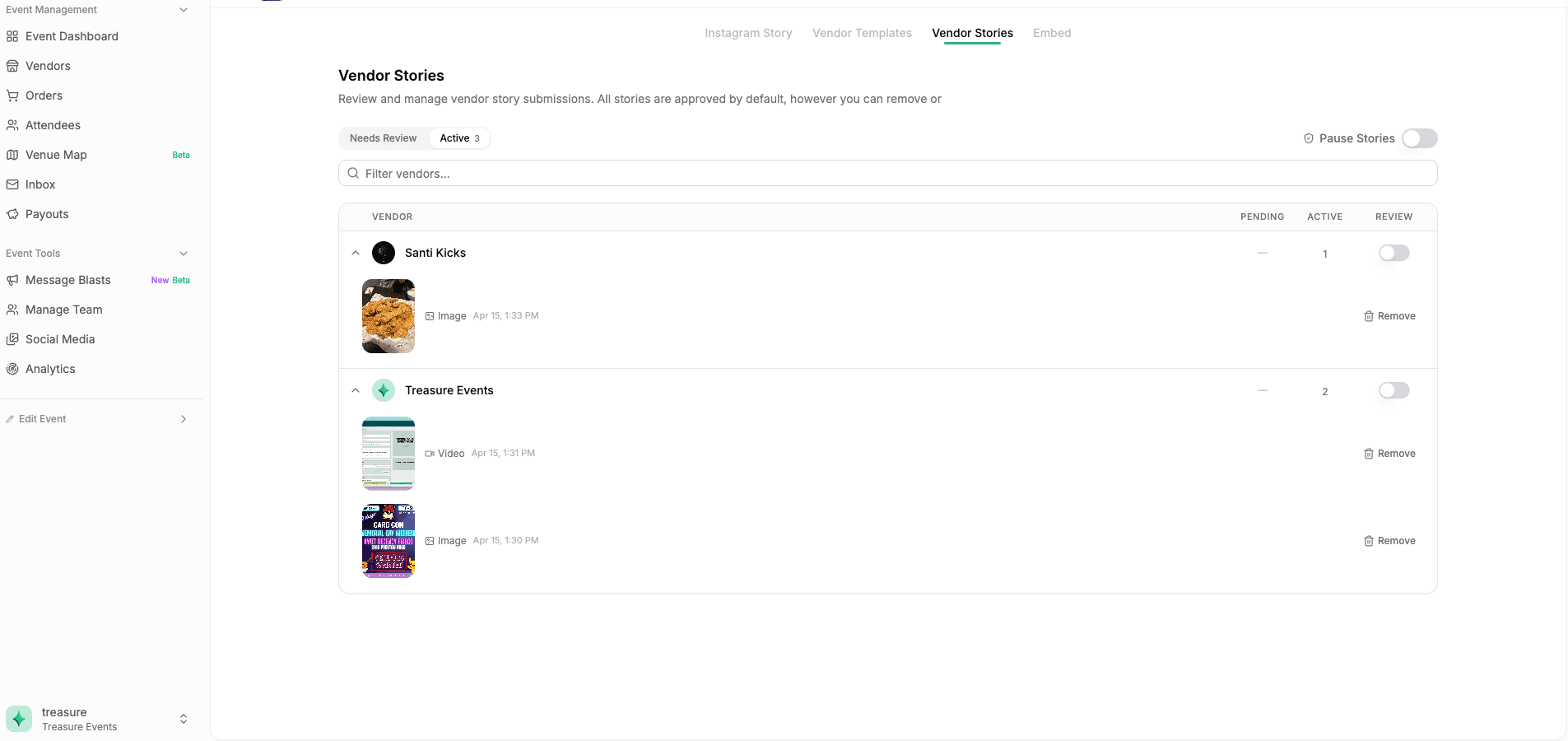
The best part is that this scales naturally. The more vendors you have posting, the more active and engaging your event page becomes, without requiring additional effort from you.
Duplicate Event Overhaul
For organizers running recurring shows, duplication is one of the most important workflows. But until now, duplicating an event often required manual cleanup or reconfiguration after the fact.
That changes with March's overhaul.
You can now choose exactly what gets carried over when duplicating an event. Instead of a one-size-fits-all copy, you have granular control over each component.
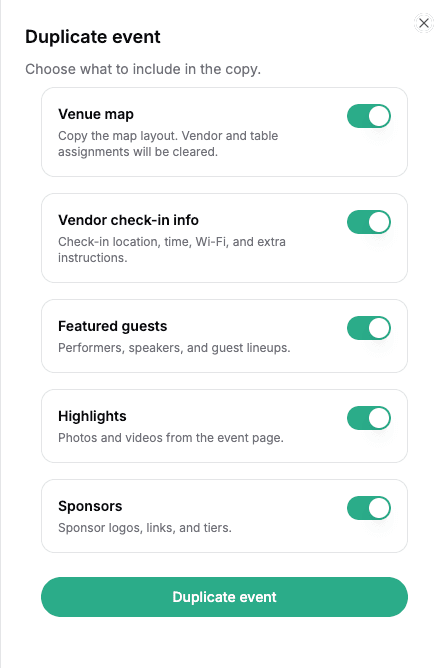
This allows you to:
- Keep what worked from previous events
- Adjust only what needs to change
- Avoid unnecessary work
Whether you want to duplicate everything or start fresh with just a few elements, the process is now flexible and intentional.
To try it out, head to your host dashboard, click the three dots on any event card, and select duplicate. From there, you can toggle exactly what you want to bring into the new event.
Event Analytics
Understanding how your events perform over time is critical for growth.
The new Event Analytics page gives you a clearer picture of how each show stacks up against previous ones, with a focus on point-in-time performance leading up to the event.

Instead of just looking at totals, you can now answer questions like:
- Were ticket sales stronger or weaker two weeks out compared to last event?
- Did tables sell faster this time around?
- How are add-ons trending across events?
By comparing timelines, not just outcomes, you can make more informed decisions about pricing, promotion timing, and vendor strategy.
This turns your past events into actionable benchmarks to help you improve with each show you run.
All of these features are available directly in your event dashboard under Social Media (for Vendor Stories), your host dashboard (for duplication), and Analytics (for event insights).
Ready to build more hype, save time, and make smarter decisions? Log in to your host dashboard to explore these updates